
Blog
How to Reset a Battery Management System (BMS) in Protection Mode
2026-02-02 | Calvin
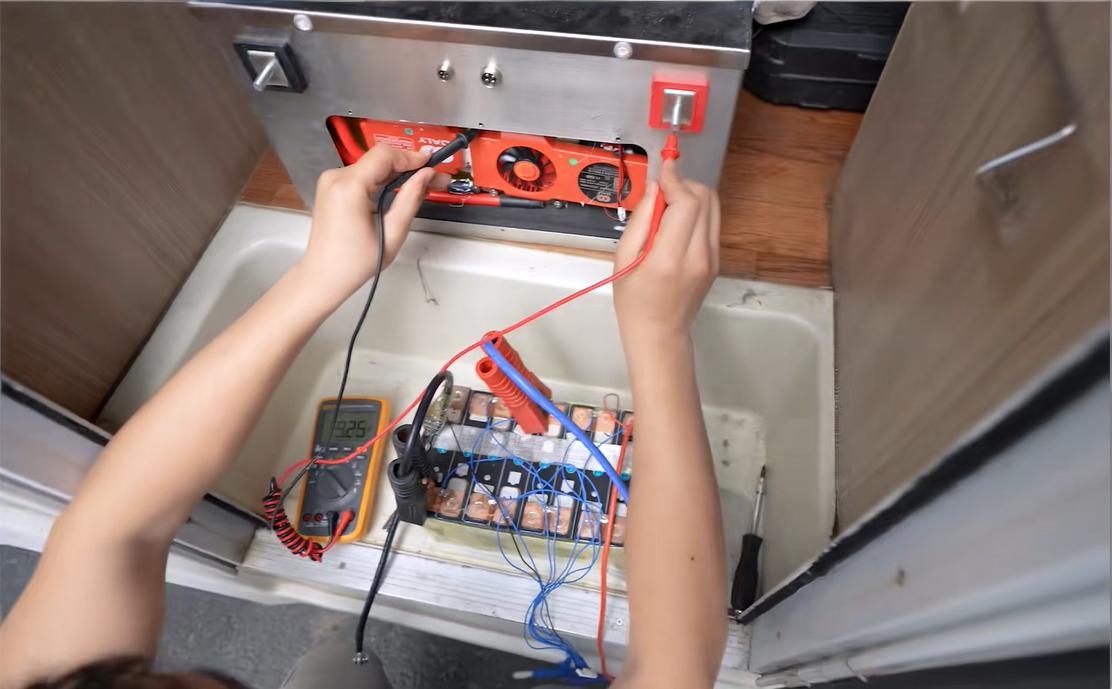
Your off-grid solar system has been running smoothly, and then suddenly, everything stops. The lights go out, and your power station shows no output. If you're seeing this, your Battery Management System (BMS) may have entered protection mode. While it might seem like a failure, this is actually a critical safety feature designed to protect your battery from damage. The BMS is the brain of your battery, keeping everything running safely.
In this guide, we'll explain why a BMS enters protection mode, how to reset it, and what to do if the issue persists. With our expertise in lithium battery and energy storage systems, we’ll provide you with the knowledge you need to regain full control of your off-grid power system.
Why Does the BMS Enter Protection Mode?
The BMS plays a crucial role in keeping your battery safe by monitoring several key parameters to ensure safe operation. When the system detects any of the following conditions, it will shut the battery down to avoid damage:
- Over-Voltage: If the battery voltage exceeds the safe limit during charging, the BMS cuts off the circuit to prevent further charging.
- Under-Voltage: If the battery voltage drops below a critical threshold, the BMS disconnects the load to avoid deep discharge, which could permanently damage the battery.
- Over-Current: If too much current is drawn from the battery, it can trigger protection mode to prevent excessive strain, often caused by a short circuit or heavy load.
- Temperature Extremes: Both high and low temperatures can affect battery health. The BMS will disconnect if the temperature is too high during charging or if the temperature is too low for charging to safely occur.
Is a Tripped BMS a Sign of a Bad Battery?
No, a tripped BMS does not mean your battery is bad. In fact, it’s a sign that the BMS is working as it should. The BMS is a safety mechanism that ensures the longevity of your battery by preventing dangerous situations, such as overcharging or overheating. The goal isn’t just to reset the system, but to identify and resolve the cause of the protection mode.
Step-by-Step Guide to Resetting Your BMS
Before attempting any reset, safety should always be your top priority. Below are the necessary steps to reset your BMS safely.
Pre-Reset Safety Checks
Important Disclaimer: This information is for educational purposes only. Working with electrical systems can be hazardous. If you are not confident in your abilities, please consult a professional technician.
- Isolate the Battery: Disconnect all external loads and charging sources from the battery terminals. This ensures that no external factors are contributing to the fault.
- Visual Inspection: Examine the battery for visible signs of damage such as bulging, leaking fluid, or melted wires. If any of these signs are present, do not attempt to reset the system. The battery may be beyond repair.
- Check Voltage: Use a multimeter to measure the voltage at the battery terminals. If the BMS is in protection mode, you will likely read zero or a very low voltage, which is expected.
Methods for BMS Protection Reset
Once you've completed the safety checks, you can proceed with resetting the BMS. There are several methods depending on the cause of the fault.
1. Automatic Reset
Many modern BMS units are designed to reset automatically once the fault condition is removed. For example, if an over-current condition caused the protection mode, simply disconnecting the oversized load can allow the BMS to re-engage the circuit after a short period.
2. Charger "Wake-Up" Method
If the BMS entered protection mode due to under-voltage, connecting a compatible charger can help "wake it up."
- Use a LiFePO4 Charger: Make sure to use a charger designed for LiFePO4 batteries. Some chargers have a "0V activation" or "rescue" mode specifically for this purpose.
- Connect the Charger: When connected, the charger's voltage will signal the BMS that a safe charging source is present, prompting it to exit protection mode.
3. Manual Reset Procedures
Some BMS models include a physical reset button or require a specific sequence to reset. These steps vary by manufacturer, so it’s essential to consult your product manual for precise instructions.
Troubleshooting: What to Do if the BMS Won’t Reset
If your BMS won’t exit protection mode after trying the reset methods above, further troubleshooting is necessary.
Persistent Fault
A persistent fault usually means the BMS is still detecting an unsafe condition. Here’s what to check:
- Wiring Issues: Inspect all connections for short circuits. A faulty load or wiring issue may be causing the BMS to remain in protection mode.
- Damaged Battery Cells: In rare cases, damaged cells may prevent the pack voltage from rising, keeping the system in protection mode. This issue could require professional service or a replacement cell.
- Faulty BMS: While rare, the BMS itself may fail. This is a last resort diagnosis after other causes have been eliminated.
A Word of Caution: Never Bypass the BMS
There is information online about bypassing the BMS protection mode, but we strongly advise against it. The BMS is your battery’s primary safeguard against overcharging, over-discharging, and thermal runaway, all of which can lead to dangerous situations such as fires or irreparable damage.
Bypassing the BMS, even temporarily, exposes the battery to unnecessary risk. If you suspect that the BMS is malfunctioning, consult a professional before considering any bypass measures.
Conclusion
Your Battery Management System is essential for the safety and longevity of your battery, and resetting it properly ensures that you avoid further damage. Regularly monitoring your system and following the correct reset procedures when issues arise can save you time, money, and headaches.
- Next:Ultimate Guide to NMC Batteries: Everything You Need to Know
- Previous:The Ultimate Guide to 36V Batteries: Everything You Need to Know
Contact Details
Lithium LiFePO4 Batteries and Lithium LiFePO4 Cells Supplier - LiFePO4 Battery Shop
Contact Person: Miss. Elena Wang
WhatsApp : +8615263269227
Skype : +8615263269227
WeChat :15263269227
Email : info@lifepo4batteryshop.com
All Products
- TC Elcon Charger (0)
- Headway Lithium Battery (6)
- Blade Battery (10)
- Semi Solid State Battery (6)
- A123 Battery (5)
- Sinopoly Battery (7)
- GBS Battery (16)
- CALB Battery (23)
- Cylindrical Cell (8)
- Energy Storage System (0)
- Battery Management System (5)
- Sodium ion Battery Cell (4)
- Lithium Titanate Battery (20)
- Ternary Lithium Battery Cell (11)
- REPT Battery (10)
- BYD Battery (2)
- CATL Battery (15)
- Thunder Sky Winston Battery (21)
- EVE Battery (30)
- LiFePO4 Battery Cell (10)
Certification
Customer Reviews
- I have fond memories of our meeting in Shanghai with LiFePO4 Battery Shop Elena. Your company left a strong impression on me with its impressive growth and professionalism. We both value straightforwardness and honesty, which I believe are the most important qualities in any partnership. I am confident that we can build a successful collaboration based on these shared values. —— Robert from USA
- I've been working with LiFePO4 Battery Shop for years, and their reliability is unmatched. While other suppliers frequently change sales teams, LiFePO4 Battery Shop has consistently provided exceptional service with a stable team. Their commitment to quality and customer support truly sets them apart. —— Henry from Australia