
Blog
Everything You Need to Know About the Symptoms of Bad Battery Cells
2026-04-11 | Calvin
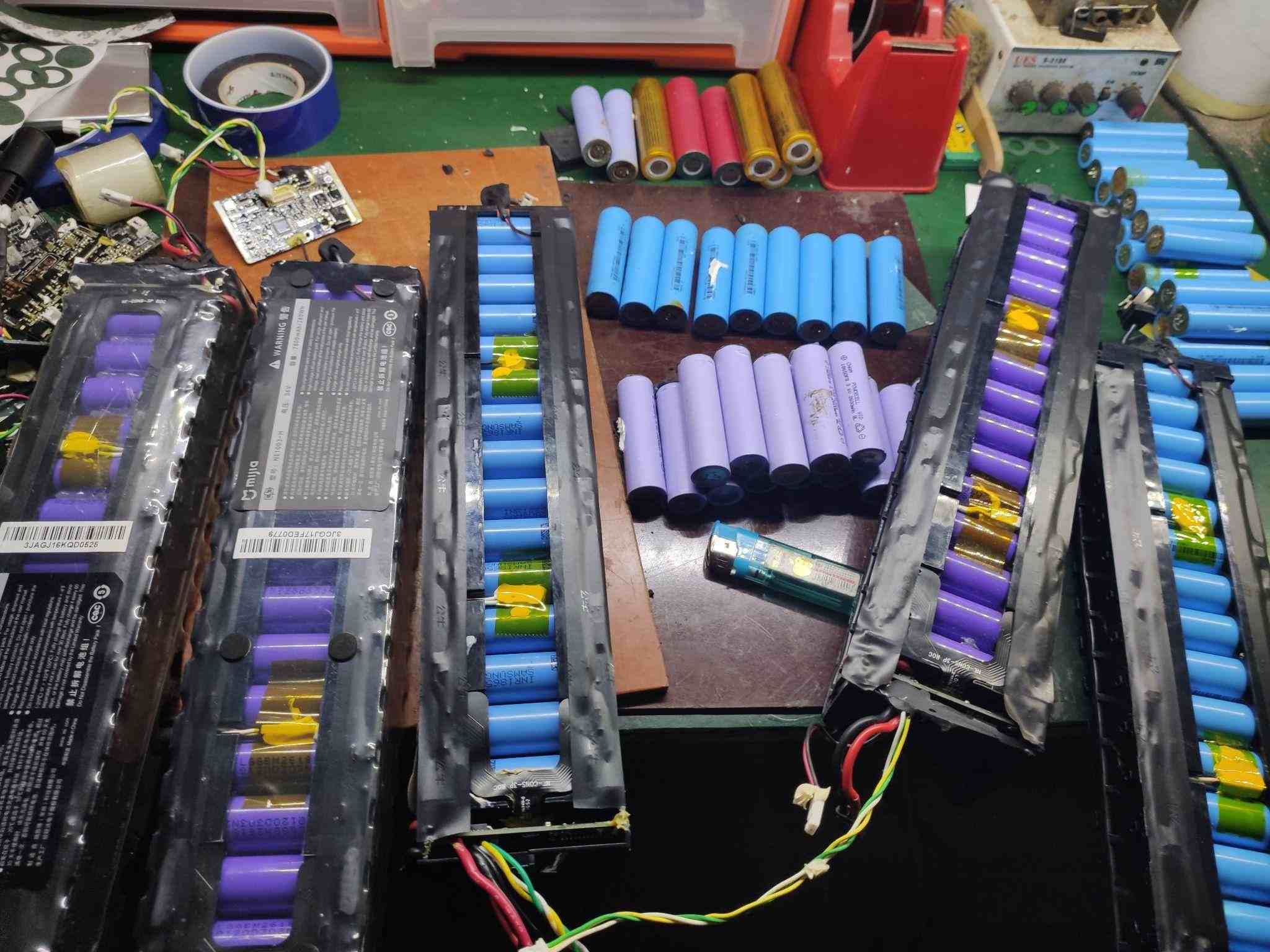
Have you ever wondered why your once reliable gadgets start malfunctioning? It could be a bad battery cell causing the issue. In this article, we’ll delve deep into the world of dead lithium batteries. From identifying the signs to understanding the causes, we’ll walk you through everything you need to know about a bad battery cell.
Table of Contents
- Part 1. 10 Signs and Symptoms of a Bad Battery Cell
- Part 2. What Causes a Dead Cell in a Battery?
- Part 3. How to Test Dead Battery Cells: Step by Step
- Part 4. What Should You Do With Old Lithium-Ion Batteries?
- Part 5. How to Deal With a Dead Lithium Battery: Replace or Repair?
- Part 6. Battery Maintenance Tips
Part 1: 10 Signs and Symptoms of a Bad Battery Cell
If you notice any of the following symptoms, it might be time to inspect your battery:
- Reduced Capacity: A decrease in battery capacity means it holds less charge and requires more frequent recharging.
- Rapid Discharge: A battery may discharge quickly, even when not in use, indicating a failing cell.
- Overheating: Excessive heat during charging or discharging is a major warning sign.
- Swelling or Bulging: Any physical deformation of the battery, such as bulging, suggests internal damage.
- Inconsistent Performance: If your device randomly shuts down or experiences drastic drops in battery percentage, a bad cell may be the cause.
- Difficulty Charging: A battery that takes too long to charge or fails to reach a full charge is likely compromised.
- Sudden Voltage Drops: Voltage drops during use can lead to device shutdowns or erratic behavior.
- Increased Self-Discharge: A battery that depletes quickly when not in use is experiencing a higher self-discharge rate.
- Reduced Overall Battery Life: If the battery life has significantly decreased compared to when it was new, the cell may be failing.
- Unreliable Performance: Unpredictable performance like random reboots or freezing indicates insufficient power from the battery.
Part 2: What Causes a Dead Cell in a Battery?
Various factors contribute to a dead battery cell, including:
- Overcharging: Charging beyond the recommended limit can damage battery cells.
- Over-discharging: Letting the battery drain too low can cause cells to wear out.
- Physical Damage: Dropping or crushing a battery may damage the internal cells.
- High Temperatures: Excessive heat can affect the chemistry of the battery, leading to failure.
- Age: Over time, batteries naturally wear out, especially after numerous charge cycles.
- Manufacturing Defects: Some batteries may have inherent defects that lead to premature failure.
- Poor Maintenance: Neglecting proper battery care, such as charging in extreme conditions, accelerates wear.
- Internal Shorts: Short circuits inside the battery can cause cell damage.
- Chemical Reactions: Unforeseen chemical reactions inside the battery may result in damage.
- Bad Luck: Sometimes, a cell fails without an obvious cause.
Part 3: How to Test Dead Battery Cells: Step by Step
Follow these steps to test a suspected dead battery cell:
- Visual Inspection: Check for any visible damage, such as bulging, cracks, or leakage.
- Voltage Check: Use a digital multimeter to measure the battery’s voltage. Refer to the table below for guidance on interpreting voltage readings:
| State of Charge | Voltage |
|---|---|
| 100% | 12.7 – 13.2 |
| 75% | 12.4 |
| 50% | 12.1 |
| 25% | 11.7 |
| Discharged | 0 – 11.6 |
- 0 volts: Likely short circuit.
- Under 10.5 volts: Battery has a dead cell.
- Below 12.4 volts when fully charged: Indicates sulfation.
- Cell Voltage Test: Disconnect the battery and check each cell's voltage. Healthy cells should show around 2.1 to 2.2 volts. Lower voltages indicate a dead cell.
- Load Test: If the voltage test passes but performance is poor, conduct a load test. If the voltage drops significantly under load, the cell is weak.
- Professional Testing: If unsure, take the battery to a professional testing facility for an accurate diagnosis.
Part 4: What Should You Do With Old Lithium-Ion Batteries?
Handling dead lithium-ion batteries responsibly is essential to prevent fire hazards and environmental risks. Here’s how you can dispose of them properly:
- Recycle: Find a local battery recycling center or store that accepts old batteries.
- Takeback Programs: Some manufacturers and retailers offer battery takeback programs.
- Call2Recycle: Participate in the Call2Recycle program for safe battery recycling.
- Follow Local Regulations: Check with local authorities for specific disposal guidelines.
- Donate or Repurpose: If still functional, donate the battery or repurpose it for low-power projects.
- Proper Storage: When not in use, store the battery at around 50% charge in a cool, dry place.
- Avoid Landfill Disposal: Never throw lithium-ion batteries in the trash due to their environmental impact.
Part 5: How to Deal With a Dead Lithium Battery: Replace or Repair?
When your lithium-ion battery dies, consider the following options:
- Assess Cost: Compare the cost of repair versus replacement.
- Warranty: Check if the battery is under warranty for repairs or replacement.
- Evaluate Damage: Minor issues may be repairable, but severe damage likely requires replacement.
- Check Availability: Ensure parts are available if you choose to repair.
- Safety First: If the battery is heavily damaged, replacement may be safer.
- Performance: Consider whether repair will restore the battery’s full performance.
- Consult a Professional: Seek expert advice if unsure about the best option.
Part 6: Battery Maintenance Tips
To prolong battery life and optimize performance, follow these tips:
- Charge Regularly: Avoid letting the battery fully discharge often.
- Avoid Extreme Temperatures: Store and charge your battery in moderate conditions.
- Store Properly: When not in use, store the battery at around 50% charge in a cool, dry place.
- Use Compatible Chargers: Always use chargers recommended by the manufacturer.
- Avoid Overcharging: Unplug the battery once it’s fully charged to prevent degradation.
- Avoid Fast Charging: Use fast charging sparingly, as it can shorten battery lifespan.
- Clean Connections: Keep the battery terminals clean for better electrical contact.
- Monitor for Swelling: Regularly check for signs of swelling or bulging.
- Replace When Necessary: If performance is poor, replace the battery promptly to avoid further issues.
In conclusion, understanding how to spot a bad battery cell and properly dispose of or repair it can save you time, money, and frustration. Always follow best practices for maintenance and safety to keep your devices running smoothly.
- Next:3.7V Rechargeable Battery Guide
- Previous:The Ultimate Guide to Battery State of Charge (SoC) and State of Health (SoH): What Every Battery User Needs to Know
Contact Details
Lithium LiFePO4 Batteries and Lithium LiFePO4 Cells Supplier - LiFePO4 Battery Shop
Contact Person: Miss. Elena Wang
WhatsApp : +8615263269227
Skype : +8615263269227
WeChat :15263269227
Email : info@lifepo4batteryshop.com
All Products
- TC Elcon Charger (0)
- Headway Lithium Battery (6)
- Blade Battery (10)
- Semi Solid State Battery (6)
- A123 Battery (6)
- Sinopoly Battery (7)
- GBS Battery (16)
- CALB Battery (25)
- Cylindrical Cell (9)
- Energy Storage System (0)
- Battery Management System (7)
- Sodium ion Battery Cell (4)
- Lithium Titanate Battery (22)
- Ternary Lithium Battery Cell (12)
- REPT Battery (10)
- BYD Battery (5)
- CATL Battery (15)
- Thunder Sky Winston Battery (26)
- EVE Battery (35)
- LiFePO4 Battery Cell (17)
Certification
Customer Reviews
- I have fond memories of our meeting in Shanghai with LiFePO4 Battery Shop Elena. Your company left a strong impression on me with its impressive growth and professionalism. We both value straightforwardness and honesty, which I believe are the most important qualities in any partnership. I am confident that we can build a successful collaboration based on these shared values. —— Robert from USA
- I've been working with LiFePO4 Battery Shop for years, and their reliability is unmatched. While other suppliers frequently change sales teams, LiFePO4 Battery Shop has consistently provided exceptional service with a stable team. Their commitment to quality and customer support truly sets them apart. —— Henry from Australia